ADT + Google: Saved Media Management
Quickly providing access to Google AI smart camera saved footage through personalized organization and filters.
Role
Led UX design & research
Skills
UX strategy • Research • Prototyping • Stakeholder Relations
Duration
Feb - Mar 2022
feedback Problem
Google Nest integration gives users 30x more camera history, but the lack of native search tools makes finding footage like a "needle in a haystack". This forces users to leave ADT+ for the Google Nest app, damaging brand loyalty and fragmenting the new ADT + DIY system.
target Goals
• Native Continuity: Keep users within ADT+ for the entire viewing lifecycle.
• Search Velocity: Design a lightweight, high-speed filtering system for deep history.
• Customization: Allow users to prioritize their most critical camera feeds.
bolt Impact
• 20% Support Ticket Reduction: Drove drop in media-related support tickets compared to the previous legacy product baseline.
• Higher Retention: Successfully integrated 30-day video storage, eliminating the need to exit.
• Personalized Experience: High adoption of the new customizable dashboard layout.
Background
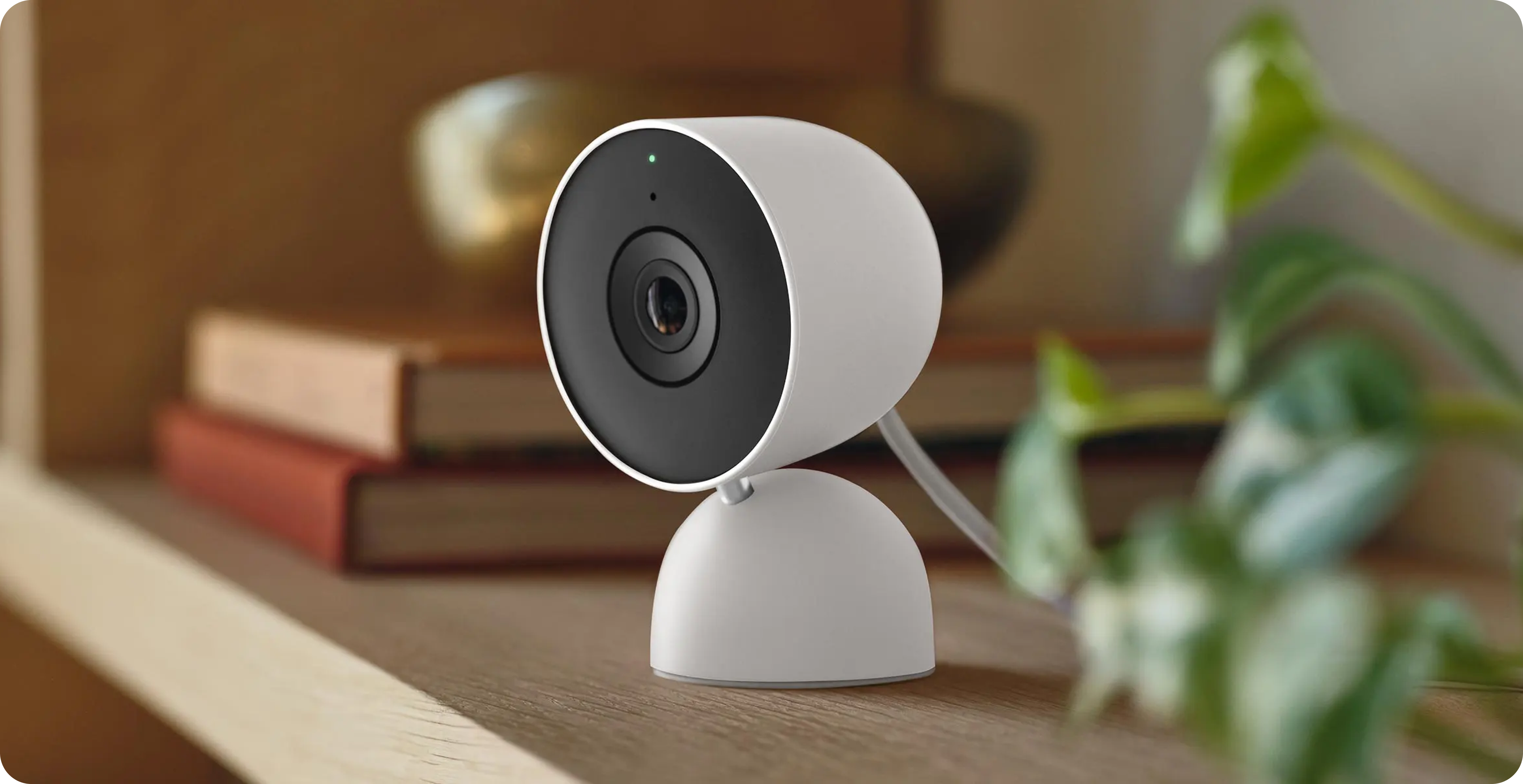
In 2020, I joined ADT with the intent of working with a small team to design a new DIY smart home app in partnership with Google called ADT+. The new system included hardware, an app, design system, and integration of Google smart devices into the ADT ecosystem.
The partnership expanded ADT's reach and core capabilities. This was especially true for the saved media experience, which went from 24 hours to 30 days, introducing AI-powered event identification.
As part of this 0 → 1 project, I focused on rapid research, sketches, iterative design, and high impact decision-making to deliver this MVP.
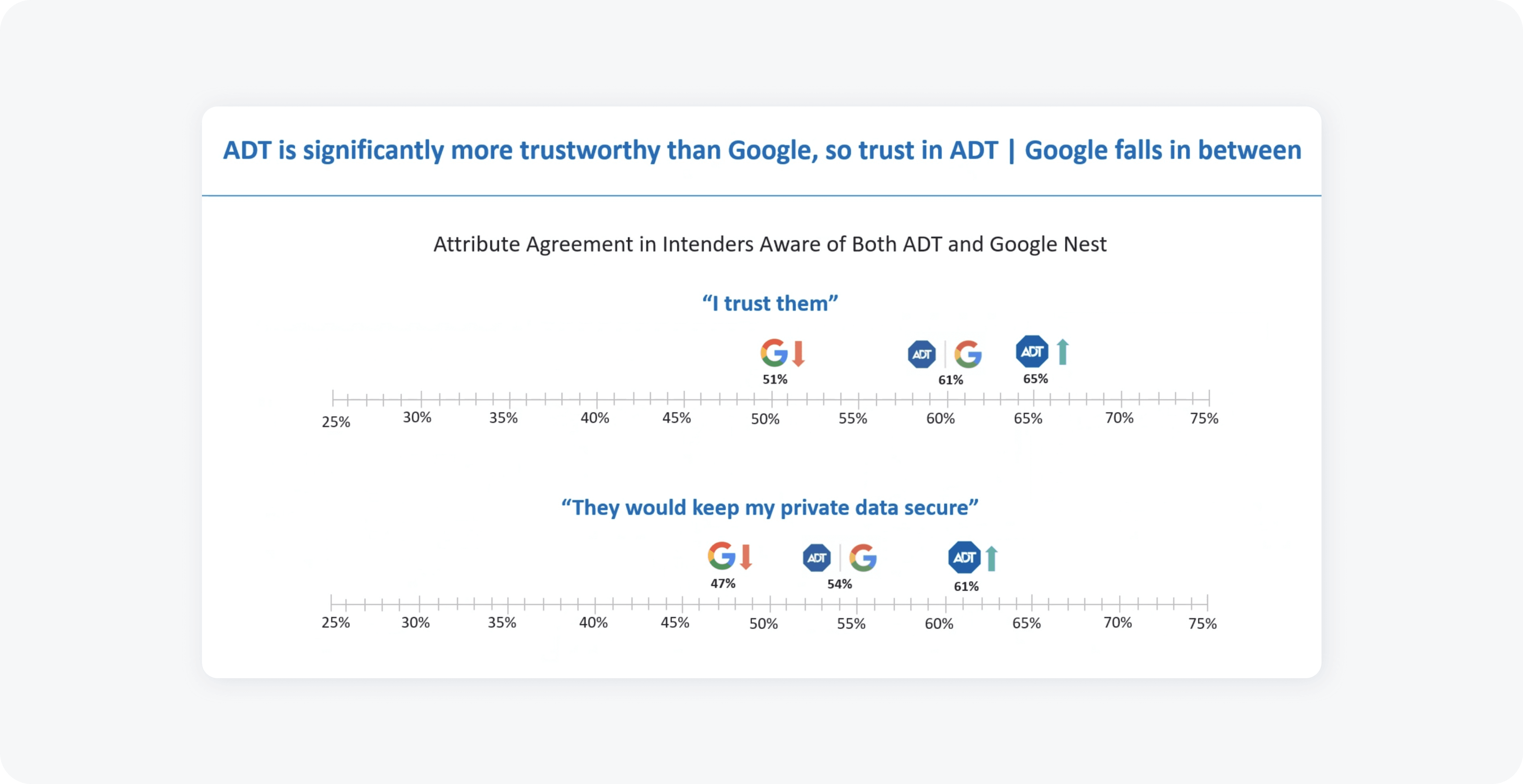
Challenge: Using Data to Bridge a "Trust Gap"
Challenging a business decision can always be tricky. Especially when that challenge is dealing with Google.
Google and ADT proposed users leaving the ADT+ app for the Google app to check their saved media. Best UX practices says this creates a disjointed experience.
To persuade change, I surveryed 1,000 ADT and Google users to reveal a critical "Trust Gap": 61% preferred ADT as stewards of their sensitive data over Google.
Mapping: Requirements & Flow
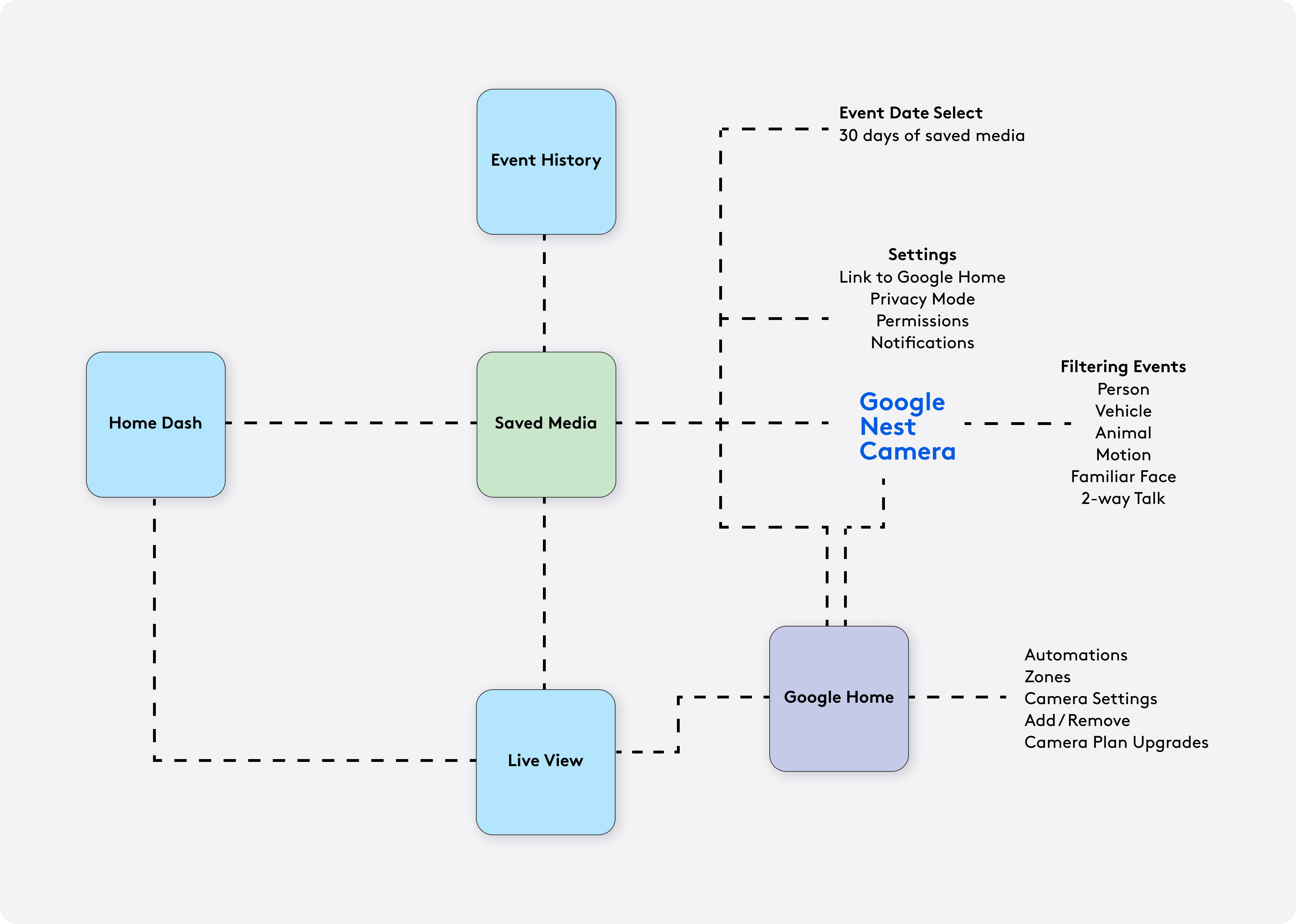
To understand how the Saved Media feature fits within the ADT+ app and Google Nest ecosystem, I created a simple flow map following a kickoff with business stakeholders and product management.
This visual helped identify key user actions, decision points, and system responses, ensuring requirements were clearly captured. I referred back to this map throughout design and iteration to maintain alignment with both user needs and business goals.
Designing for High-Stress Moments
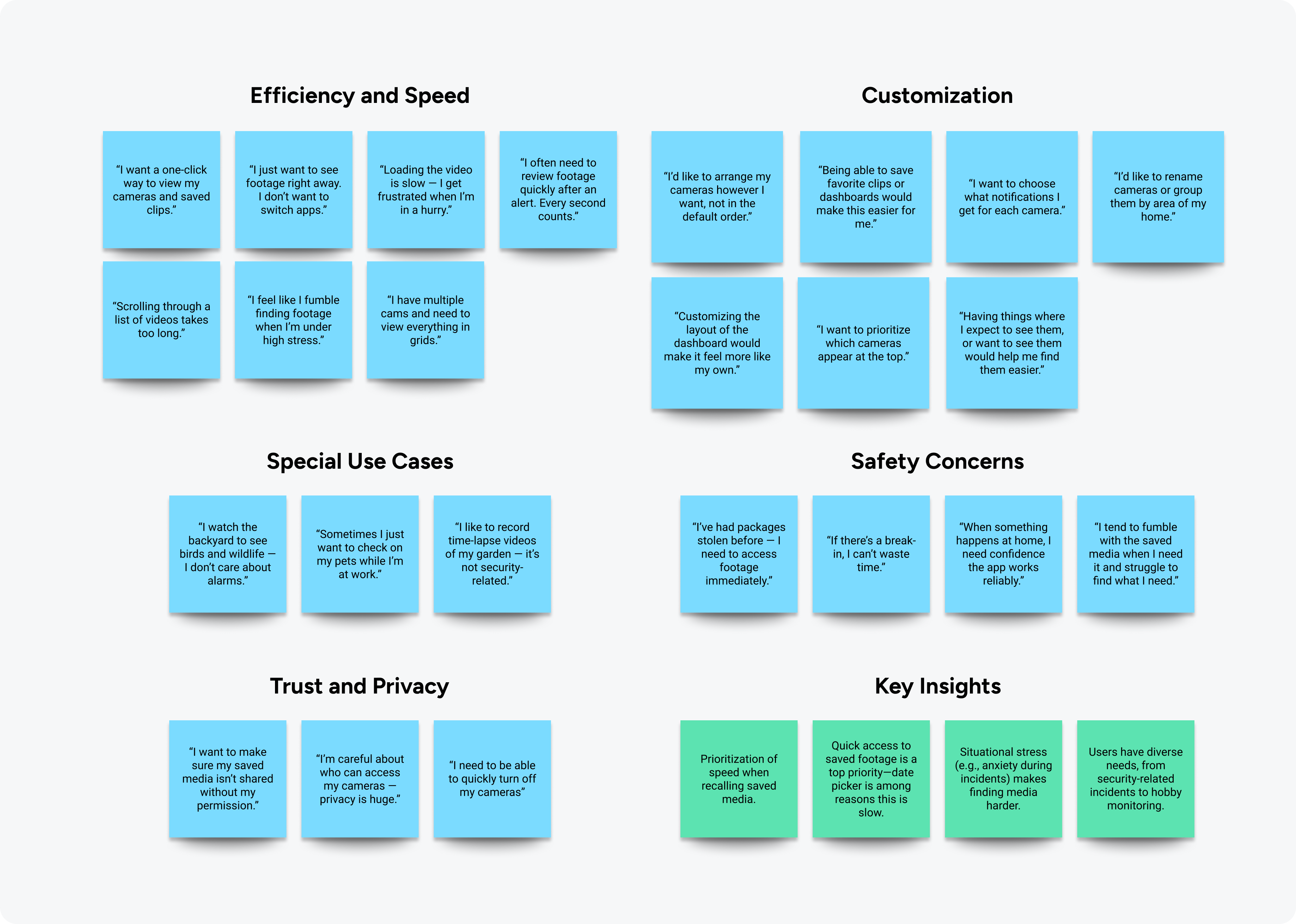
Interviewing 10 ADT power users revealed extreme use cases, from bird watchers to those who'd been involved in high-stakes security situations. For the later, I realized my design must be panic proof.
I defined four design mandates:
1. Seconds Count: Eliminate latency and taps to reduce user anxiety.
2. Adaptive Persona: Support "Casual Browsers" & "Emergency Responders."
3. Cognitive Load: Prioritize larger targets & fewer choices for navigation.
4. Contextual Priority: Ensure the most relevant footage is never buried.
Rethinking Time: The Date Carousel
Our users were frustrated with conventional date pickers in high stakes situations — Missed clicks, inability to locate them, and obscuring saved video tiles when expanded.
My intent was to design a mobile "split screen" which wouldn't rely on an overlay to prevent obscuring the saved media recording tiles.
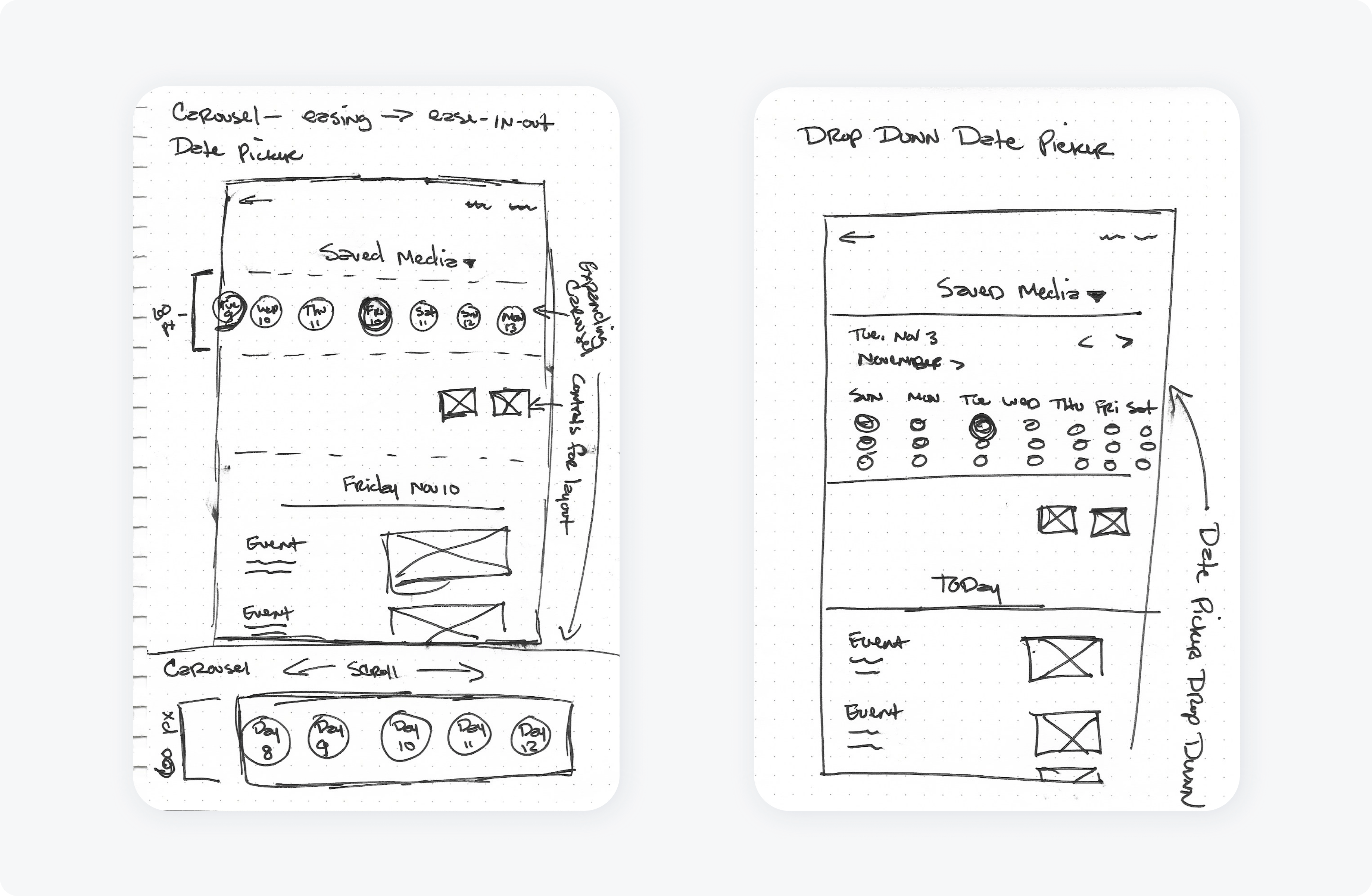
To start work on the "messy middle" of this project, I white board sketched (and later wireframed) variations of the saved media dashboard. I kept my focus on simplistic layout for event 'meta data' (i.e. event type, recording length) for easy scanning, and thinking of time in a linear manner inside a carousel rather than a clumsy date picker — though I did explore one concept with a date picker.
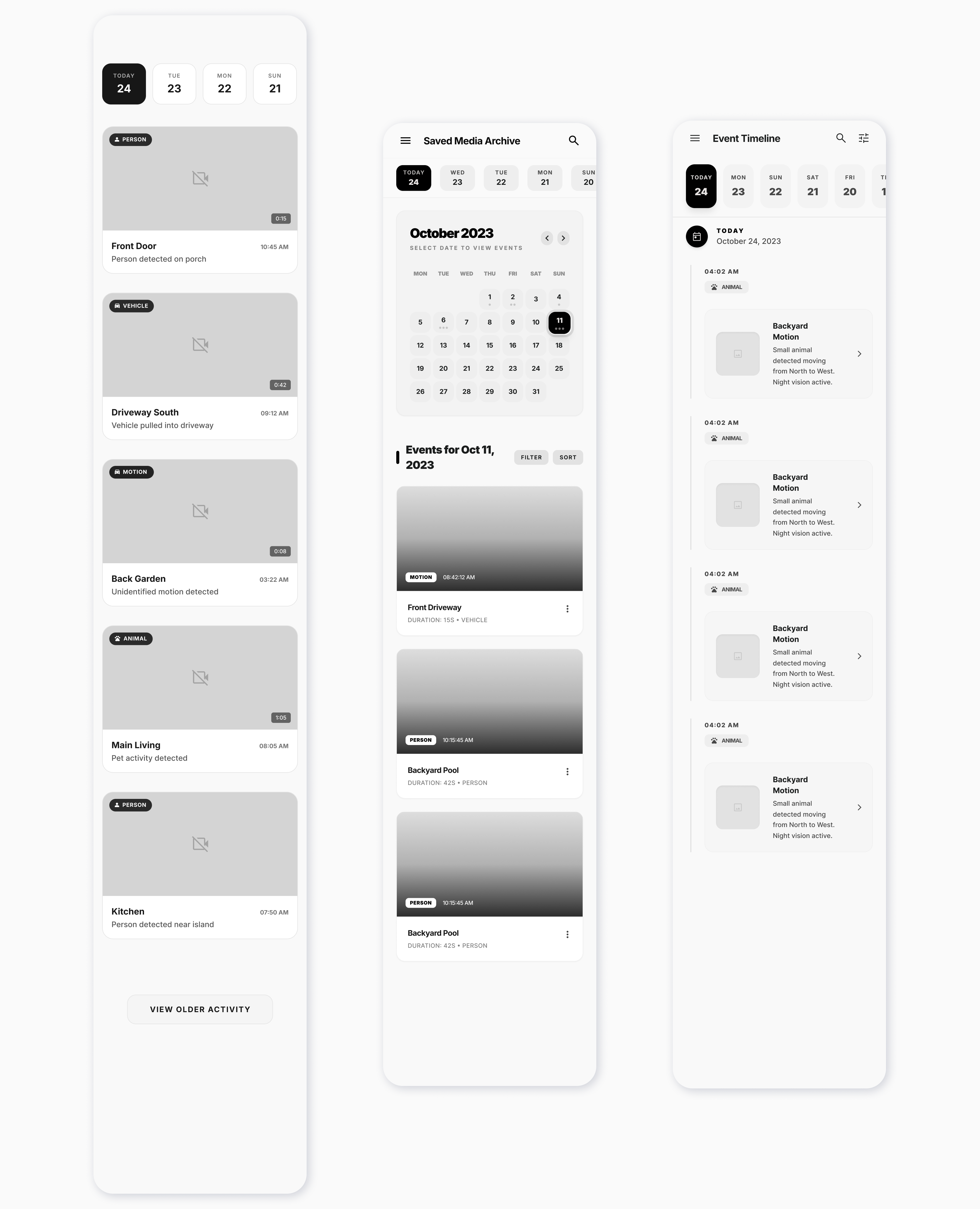
After collaborative design critiques with my team, presenting to product management, engineers and business stakeholders, and an A/B test with 5 users, the design evolved into the final solution. This featured a date carousel with round click target (inspired by vehicle digital dashboards). I also focused on maximizing simplicity by adding lots of white space to increase ease in scanning for enhanced findability of recordings.
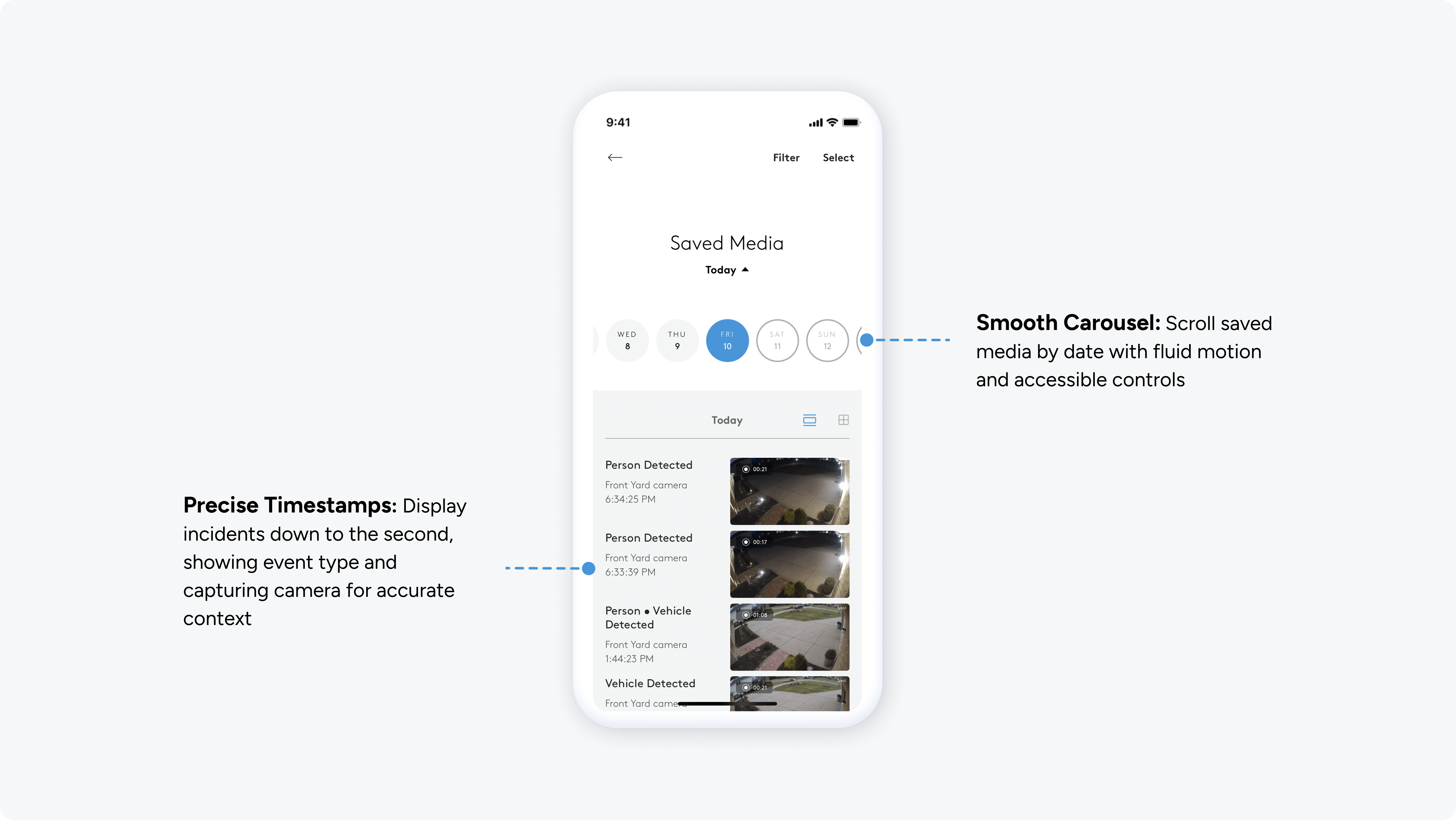
Adaptive Views: Scanners vs. Detectives
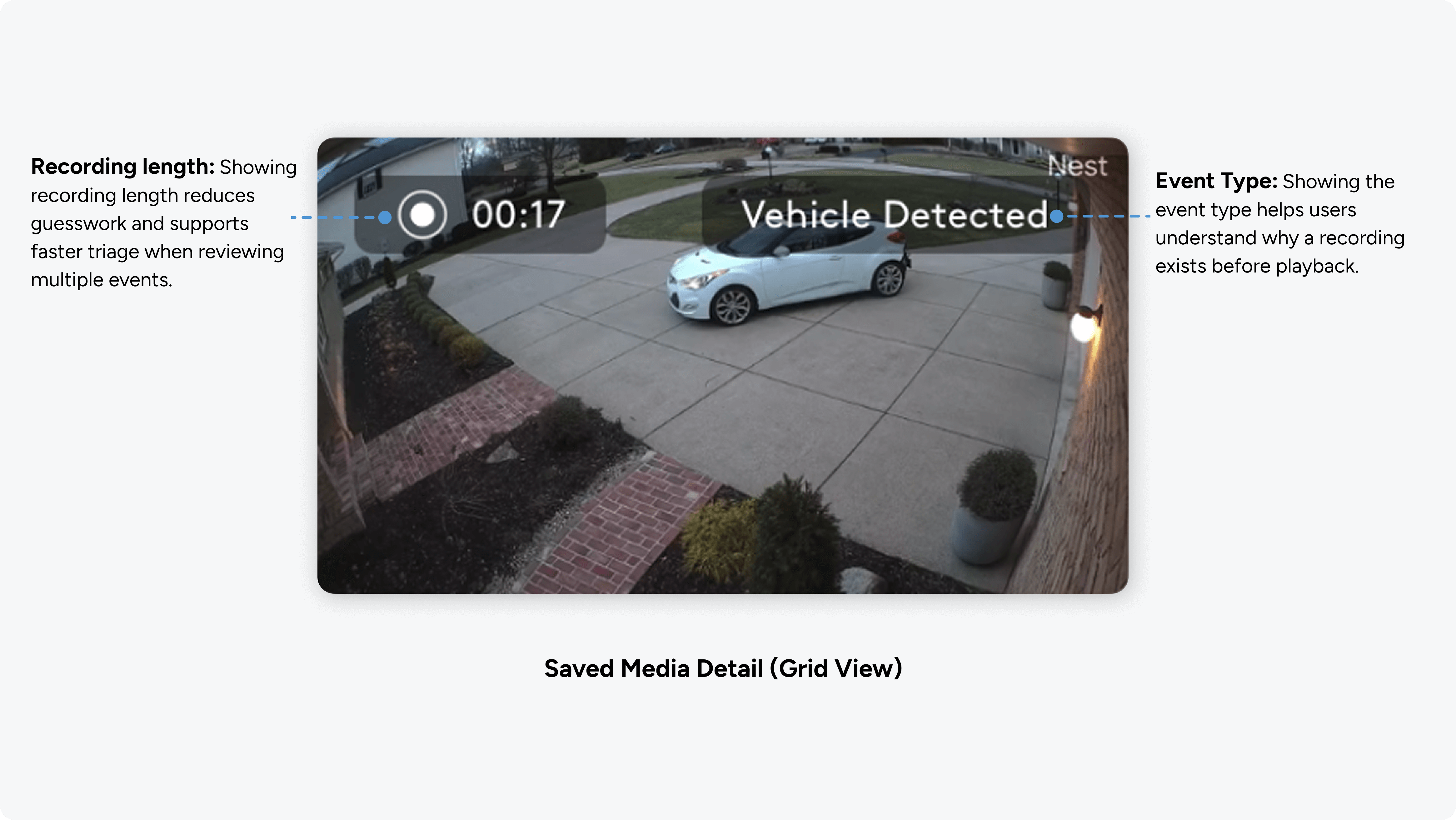
How do you test a layout in a critical security crisis? You can't. I empathetically designed for extremes, providing multi-layouts of save video tiles for users fluctuating between two modes: Rapid scanning of faces and objects, and deep investigation of timestamps.

• List vs. Grid Toggle: Instant switching between visual-heavy discovery and metadata-rich details.
• Looping Previews: Eliminated "click-and-wait" fatigue by using short, looping motion previews to verify events without playback.
• Visual Anchors: High-contrast labels (Person, Vehicle, Package) allow users to ignore the noise and find the signal instantly.
Filtering: Precision Without Complexity
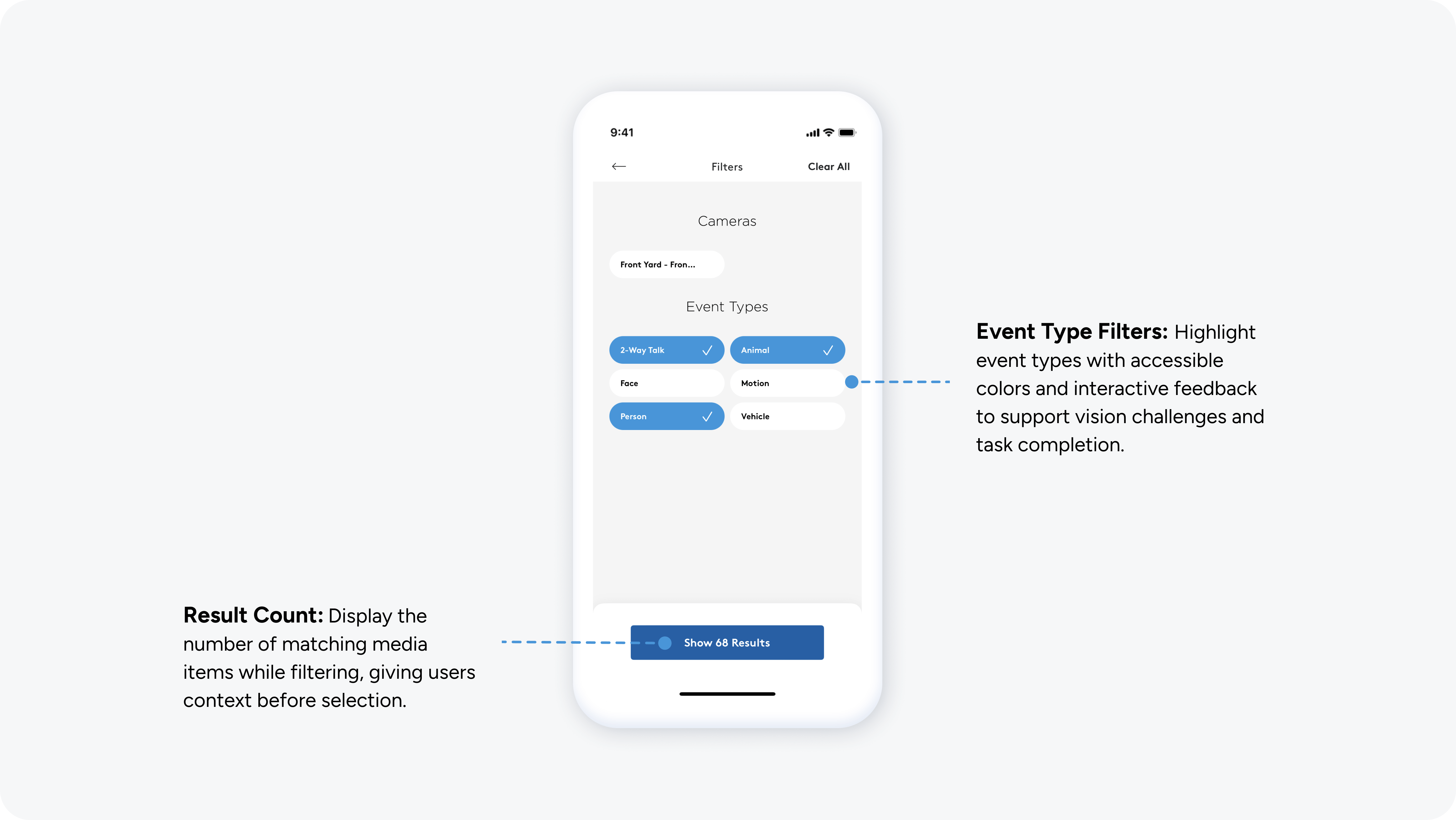
To handle 30 days of data, I designed a filter system that provides immediate feedback and clear state changes, essential for high-stress moments.
• Explicit Selection: Individual event chips ensure users act with intent and clarity.
• Animated Feedback: Chips utilize ADT brand colors and motion to reinforce selection.
• Expected Value: The primary action button dynamically updates with the count of matching recordings, reducing guesswork and unnecessary taps.
Balancing Speed and Focus
To keep the surveillance experience distraction-free, I centralized saved media and settings within a streamlined drawer. This architecture ensures that critical device controls and history remain just one tap away without cluttering the primary Live View.
• Strategic Balance: Prioritizes high-speed access & a clean UI.
• One-Tap Navigation: Reduces the distance between real-time monitoring and historical data.

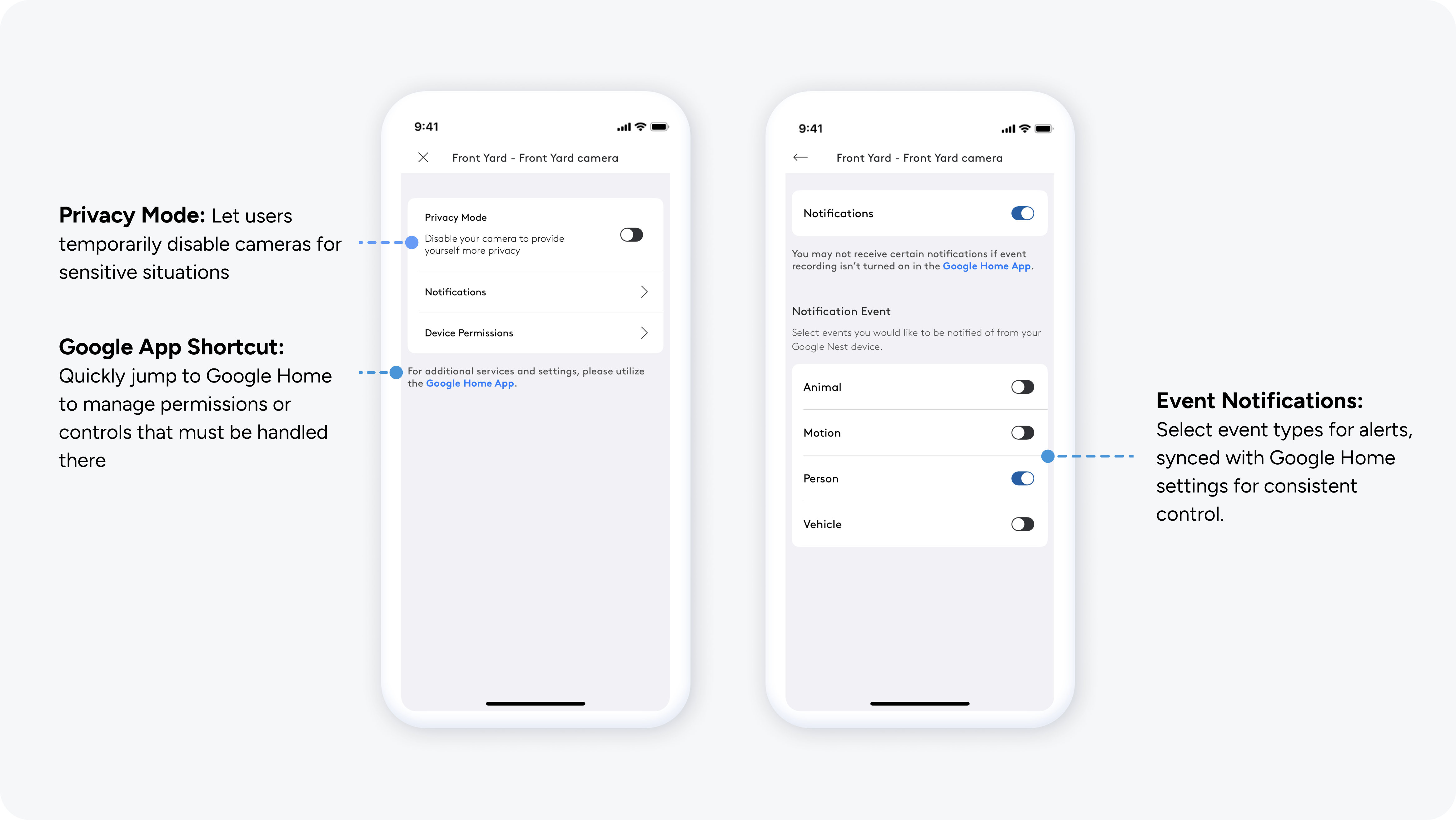
Designing Privacy as a Utility
Managing security in intimate spaces requires absolute user control. I integrated clear, compliant privacy toggles to manage the tension between surveillance and home privacy.
• Instant Privacy: A mandated toggle allows users to kill camera feeds and recordings instantly.
• Notification Customization: Users can tailor alerts (People, Animals, Vehicles) to reduce notification fatigue and focus only on relevant security events.
• Ecosystem Balance: Deep-linked settings to the Google Home app maintain consistency across the broader Nest ecosystem.
Precise Control for Reviewing Critical Moments
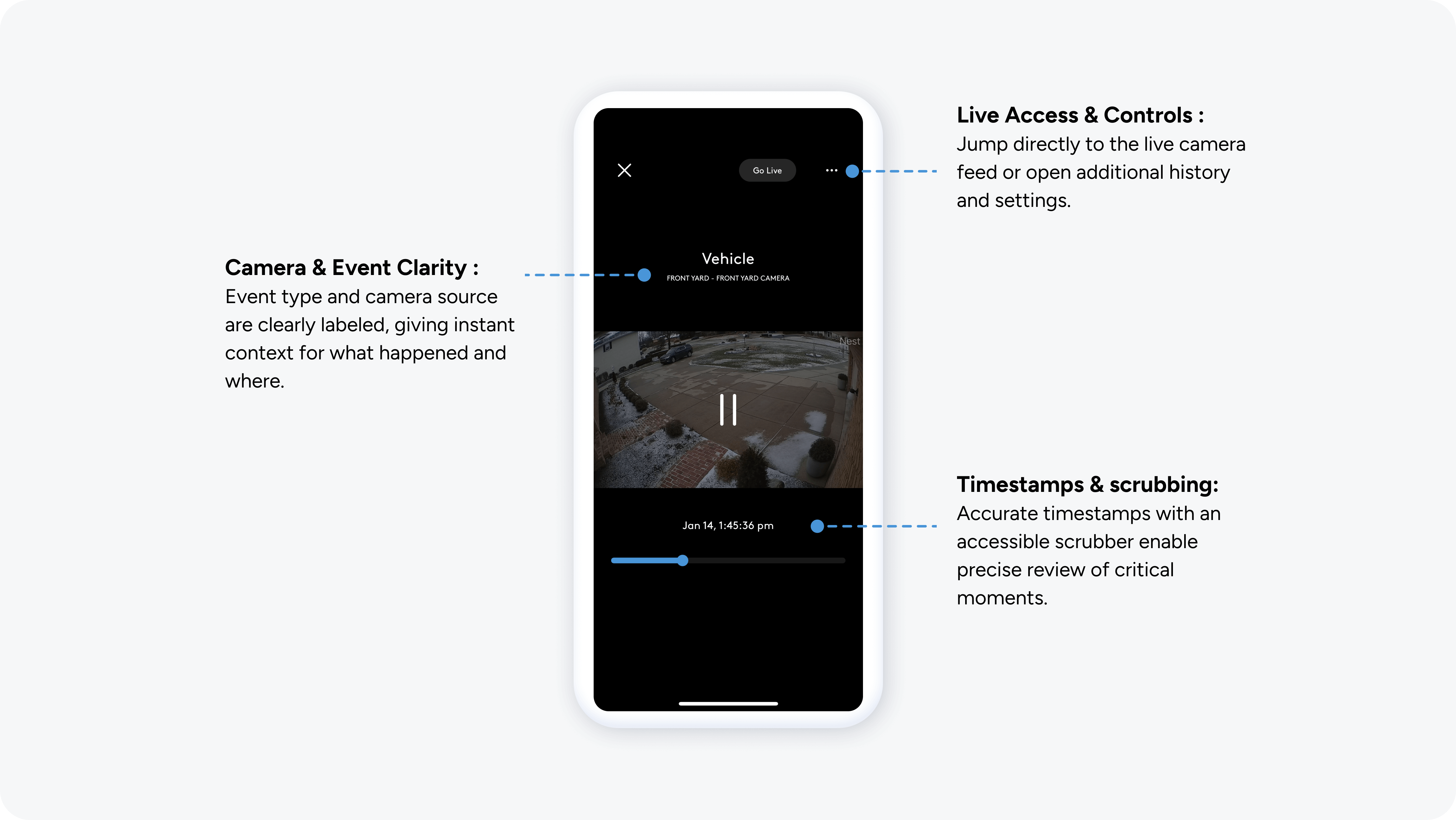
In critical moments, precision is a matter of trust. I prioritized playback accuracy and situational awareness for 'Emergency Responders'.
• Granular Control: A high-precision scrubbing handle with timestamps to the hundredth of a second provides forensic-level detail.
• Context Switching: A direct link to "Live View" allows users to move seamlessly from reviewing a past incident to monitoring a current situation.
Key Takeaways
• Balancing Complexity: I transformed technical and legal constraints into design opportunities—using privacy toggles and progressive disclosure to build user reassurance.
• Stakeholder Advocacy: Navigating two distinct organizations (ADT and Google) proved that research-backed evidence is the most effective tool for driving a user-centered strategy.
• Cognitive Load: Thoughtful interaction design—precise feedback and fluid navigation—is essential for helping users make confident decisions under extreme stress.